
Selected work · Website design and custom development
A website that grew with the business.
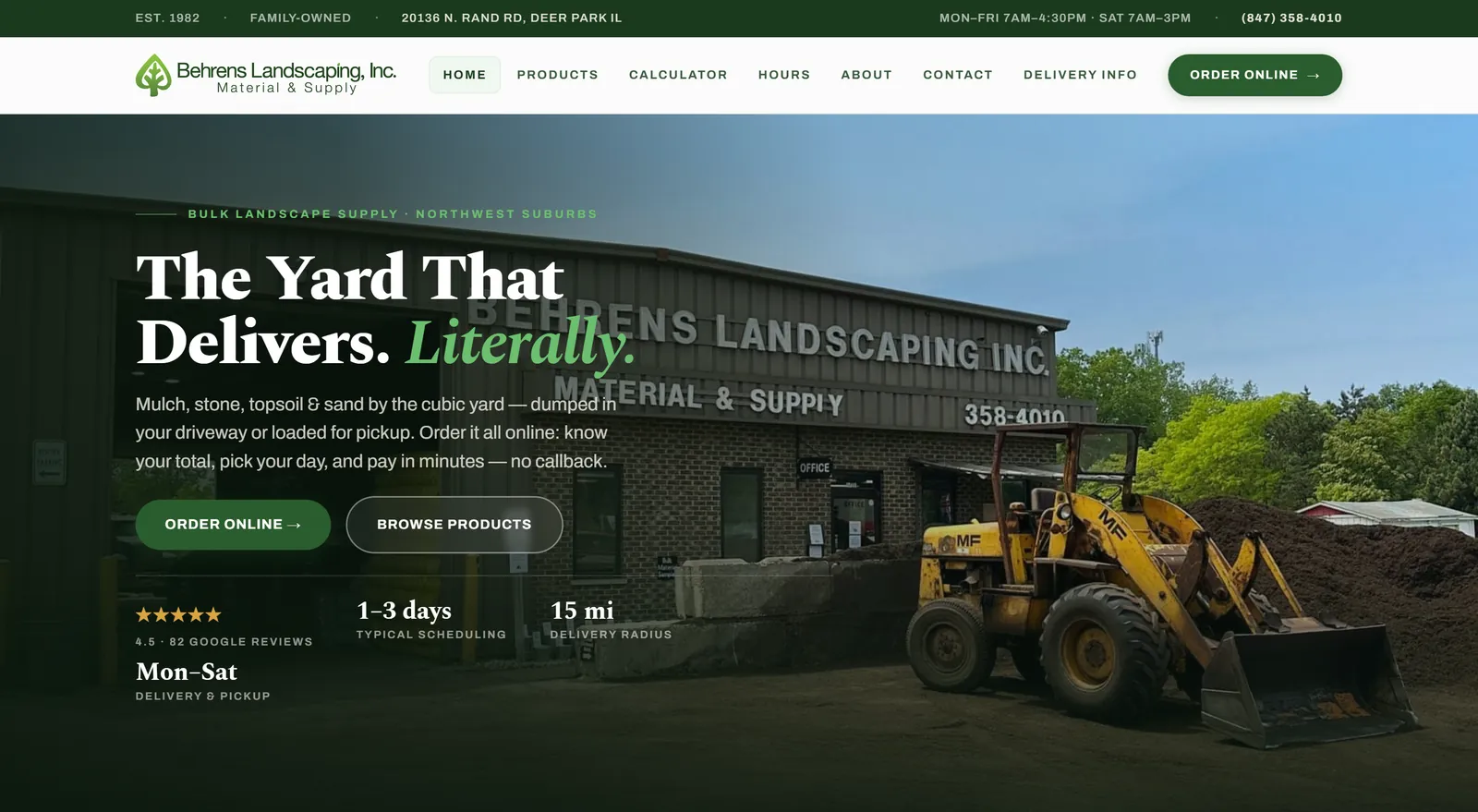
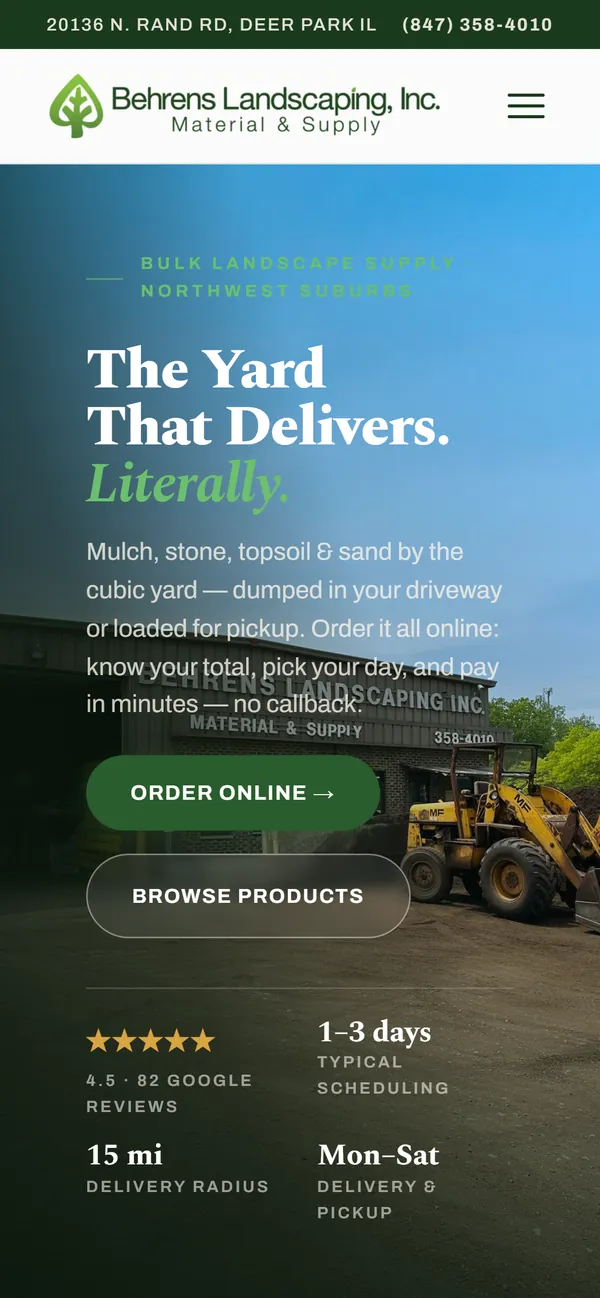
The Behrens Landscape project began as a website redesign. Over time, the business asked for more ways to help customers and support its staff. The work expanded in stages, with each addition responding to a need as it arose.
Visit behrenslandscape.com
- Client

- Relationship
- My family’s business
- Website
- behrenslandscape.com
- Work
- Website design and custom web applications
- Includes
- Public website, online ordering, staff tools
Apr–Oct
2026, six months
July 8
online ordering went live
19 years
of sales history imported
2,000+
automated checks before every release
01Background
The starting point
The first goal was to redesign the website. The broader system that exists today developed later, as conversations with the business uncovered additional features it wanted.
That gradual approach is central to the project: start with a useful website, put it to work, and agree on the next improvement when there is a reason to add it.
Behrens Landscaping is my family’s business, and it’s where this way of working was first put to the test.
02For customers
More ways to help customers
The public website brings together product information and tools that help customers plan an order. A coverage calculator and delivery lookup support common questions, while online ordering and delivery scheduling connect the website to the next step.
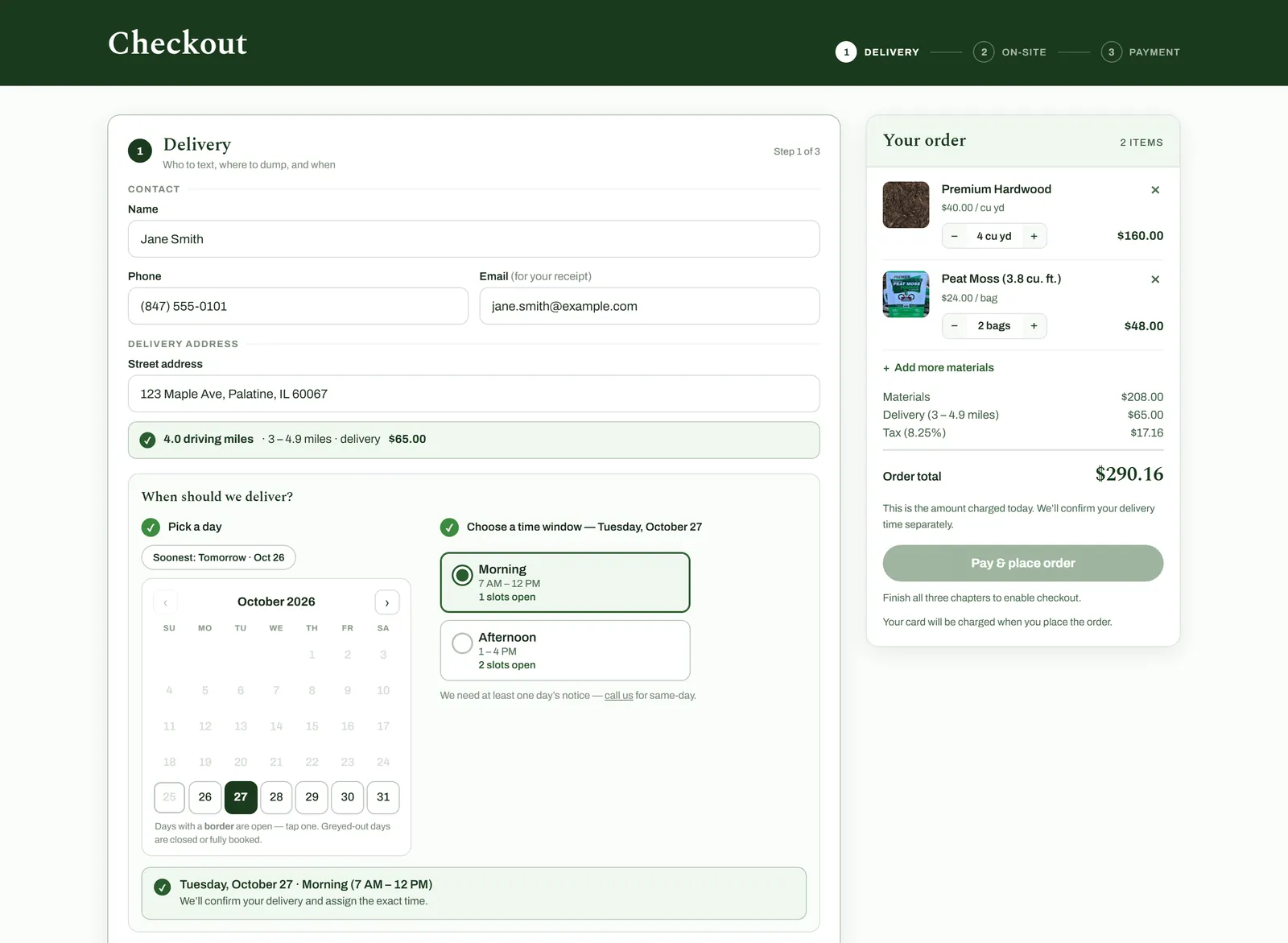
What you’re looking at 5 notes
- Three short steps. Delivery, on-site instructions, then payment, with the order total always in view.
- Fee from driving distance. The address is measured in driving miles from the yard and priced by the yard’s own delivery tiers.
- Live slot counts. Each time window shows how many delivery slots are left.
- Only open days. Days that are closed or fully booked are greyed out, based on the same schedule staff use.
- Running total. Materials, delivery and tax update as the cart changes. The server recalculates the total before any charge.
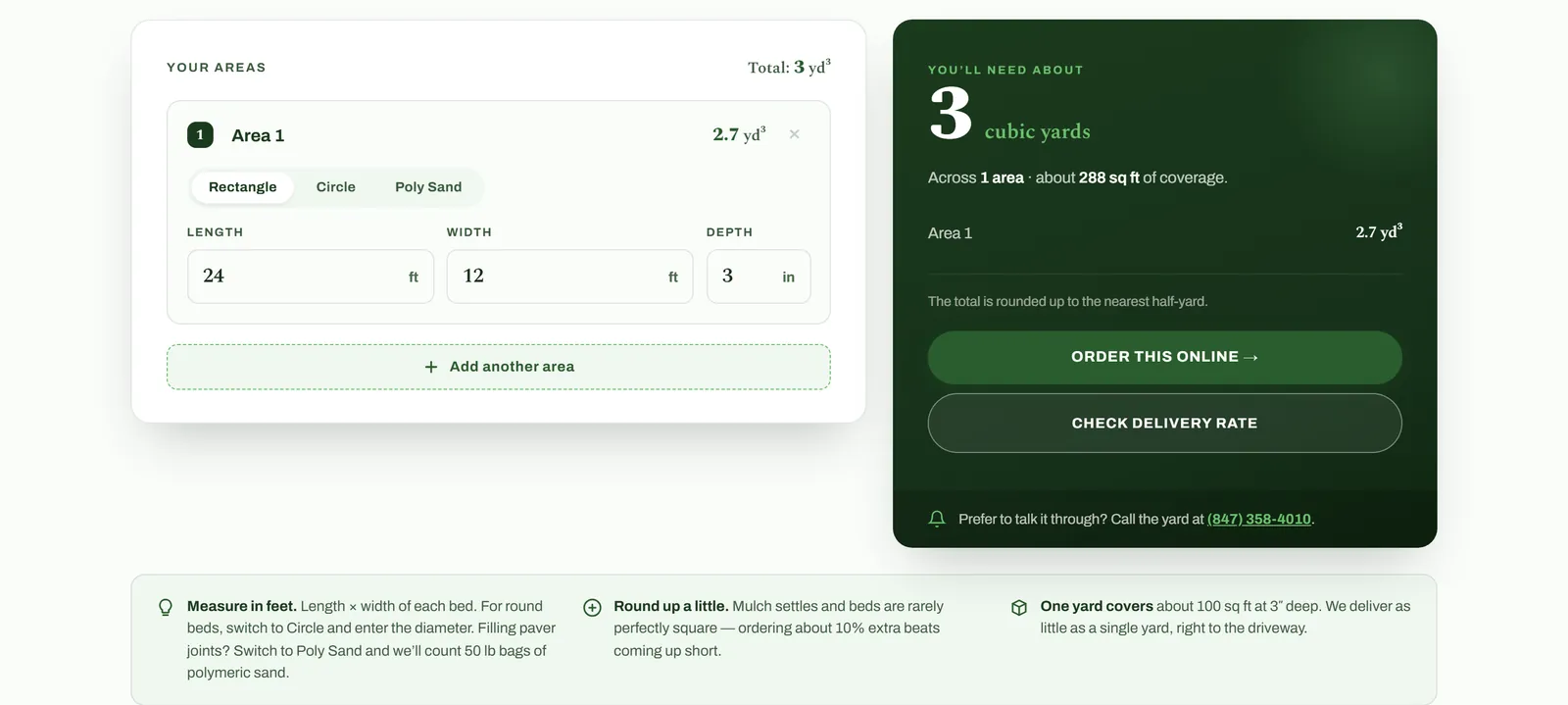
What you’re looking at 4 notes
- Shape of the area. Rectangle, circle, or polymeric sand for paver joints, so the math matches the job.
- Several beds at once. Customers add each area they’re working on, and the totals combine.
- An answer in yards. Rounded up to the nearest half-yard, the way bulk material is sold.
- Straight to ordering. The result links directly to online ordering and the delivery-rate lookup.
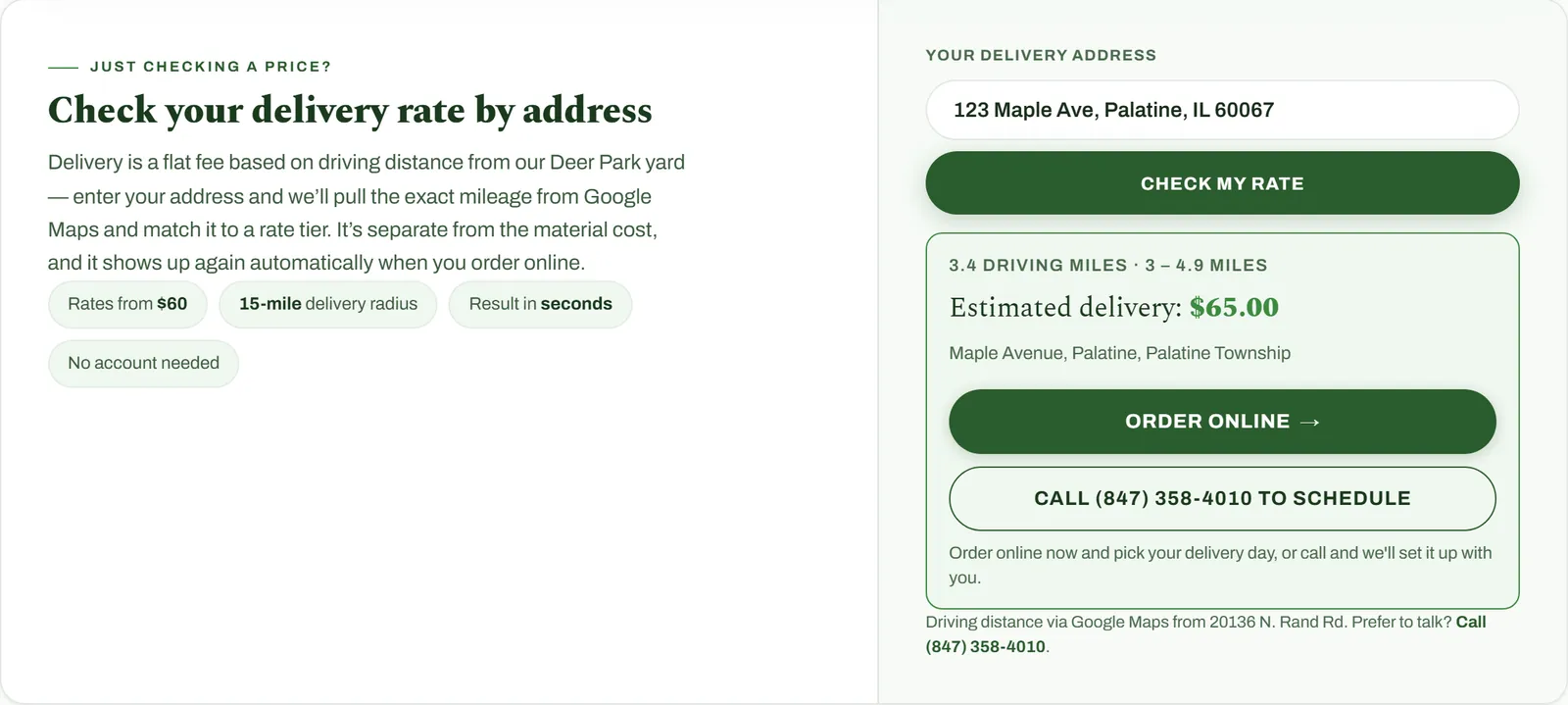
What you’re looking at 4 notes
- Answers up front. The starting rate, delivery radius, and “no account needed” are stated before anyone types.
- Just an address. Customers enter where they want the delivery; on the live site Google suggests matching addresses as they type.
- Driving miles, not a straight line. The quote uses driving distance from the yard and matches it to the yard’s rate tiers.
- Straight to ordering. From the quote, customers can order online or call to schedule.
03Operations
Bringing 19 years of history forward
Before the new system, the counter ran QuickBooks Point of Sale, with 19 years of sales locked inside the old QuickBooks system. Rather than start from zero, that history was exported and brought into the new system.
- Exported and converted
- The QuickBooks tables were exported and a script converted them, storing every amount in exact cents and confirming the totals matched the source.
- Kept separate
- The history lives in its own database, apart from live orders, so heavy reports never slow down the register. The app only reads from it.
- Cleaned and checked
- Quirks in the old data were fixed, such as returns that had been counted as sales, unrelated items sharing an ID, and inconsistent units. The results were checked against QuickBooks’ own reports.
- Put to work
- Staff see year-over-year sales, best and worst sellers, busy hours, and old receipts right alongside new ones. Renamed products can be combined for reports without changing the original records.
- Nothing counted twice
- Each sale lives in exactly one system. The new register’s history starts the day QuickBooks was retired.
04Operations
Tools for daily work
The project also includes staff tools for customer records, orders, scheduling, inventory, and reports. These capabilities extend the work beyond the public pages and into the activities behind them.
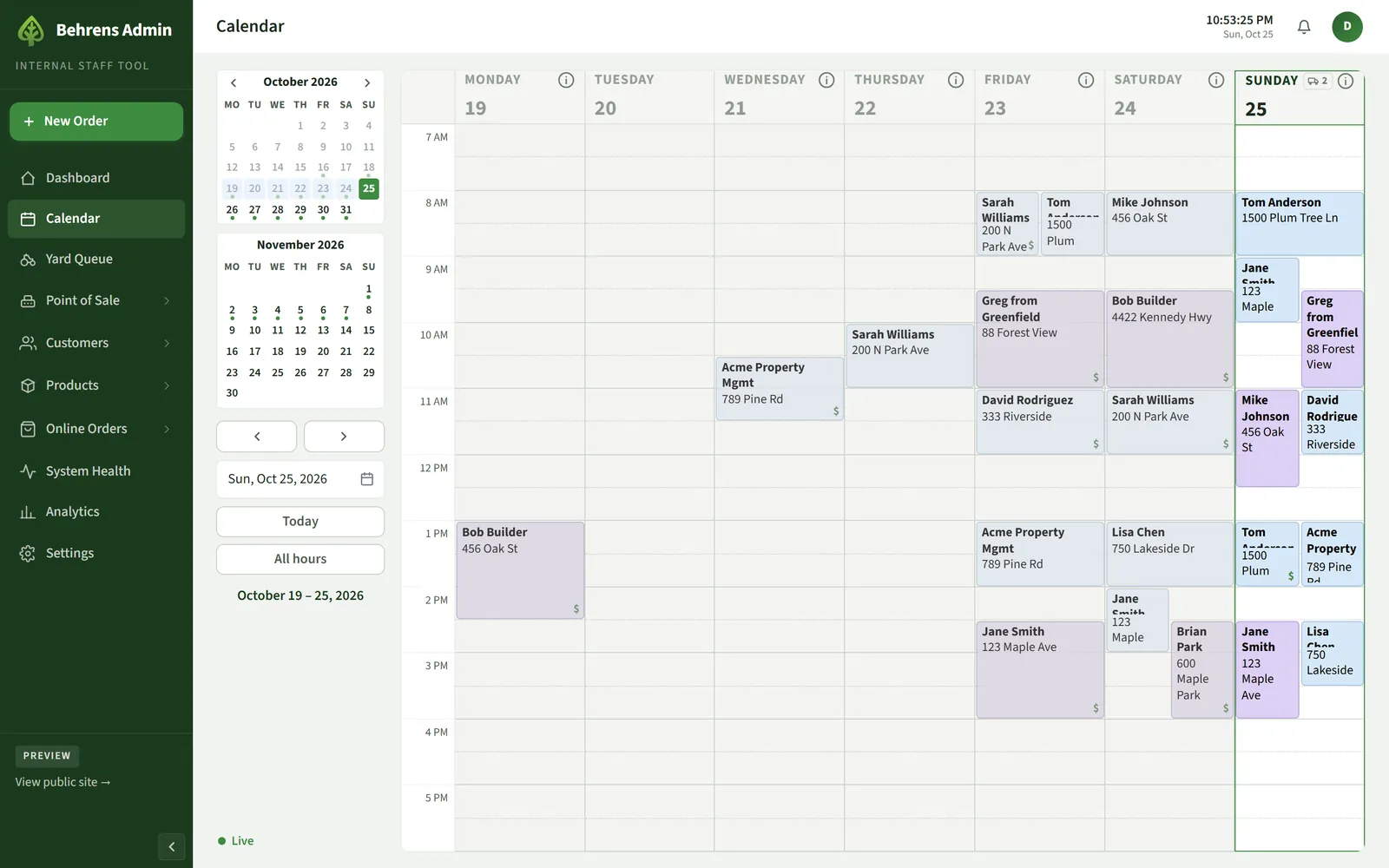
What you’re looking at 4 notes
- Month at a glance. Dots mark the days that already have deliveries booked.
- Deliveries by truck. Each block is a delivery: blue for the small truck, purple for the big truck.
- Paid marker. A dollar sign shows the delivery is already paid, so the driver has nothing to collect.
- Live updates. The calendar refreshes on its own as staff add or move orders.
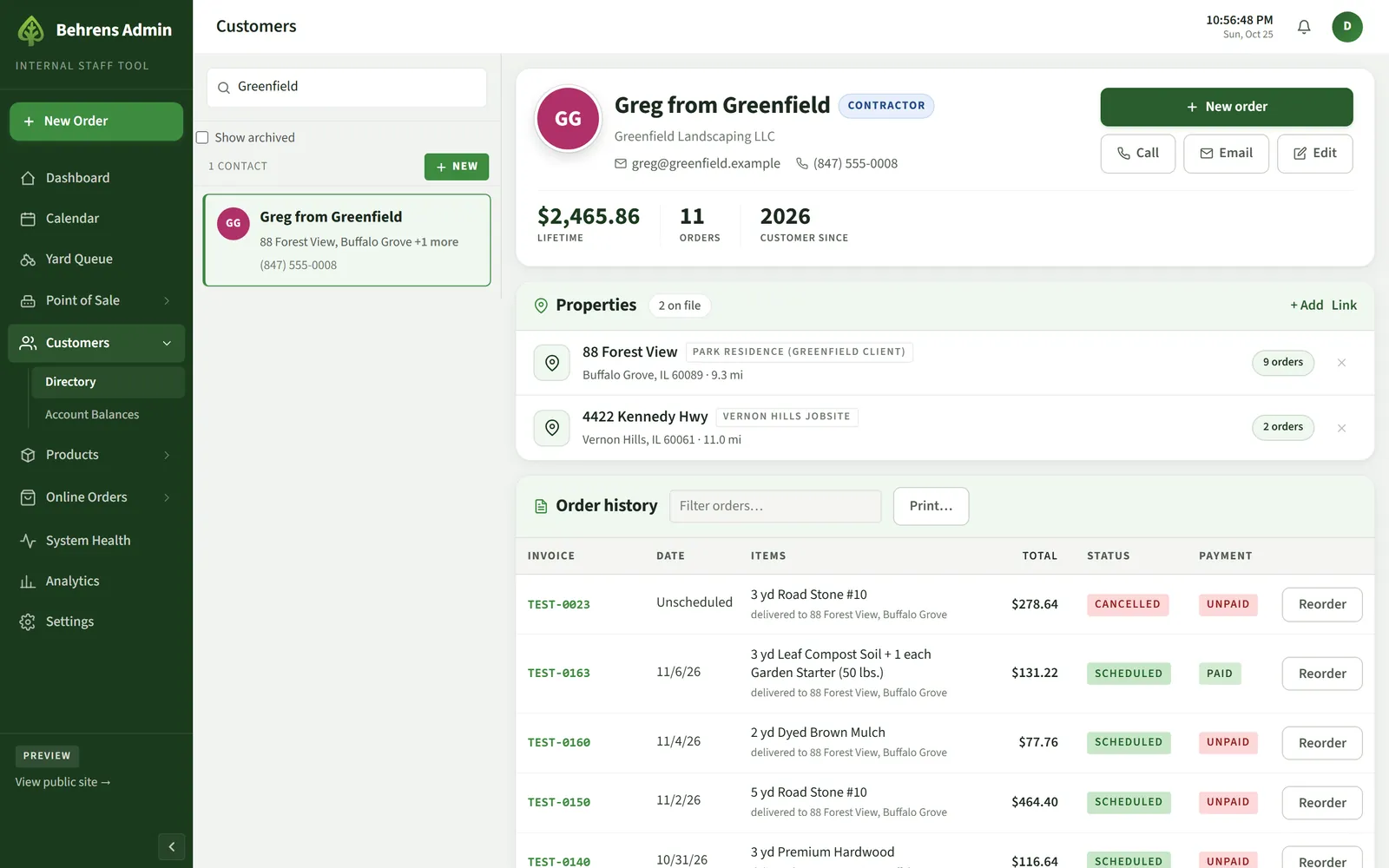
What you’re looking at 4 notes
- Customer type. Contractor accounts are flagged so the right pricing applies to their orders.
- History in numbers. Lifetime spend, order count, and how long they’ve been a customer.
- Every job site. Each property keeps its own address, distance from the yard, and notes.
- Orders and payment. Every order with its status and payment, plus one-click reorder.
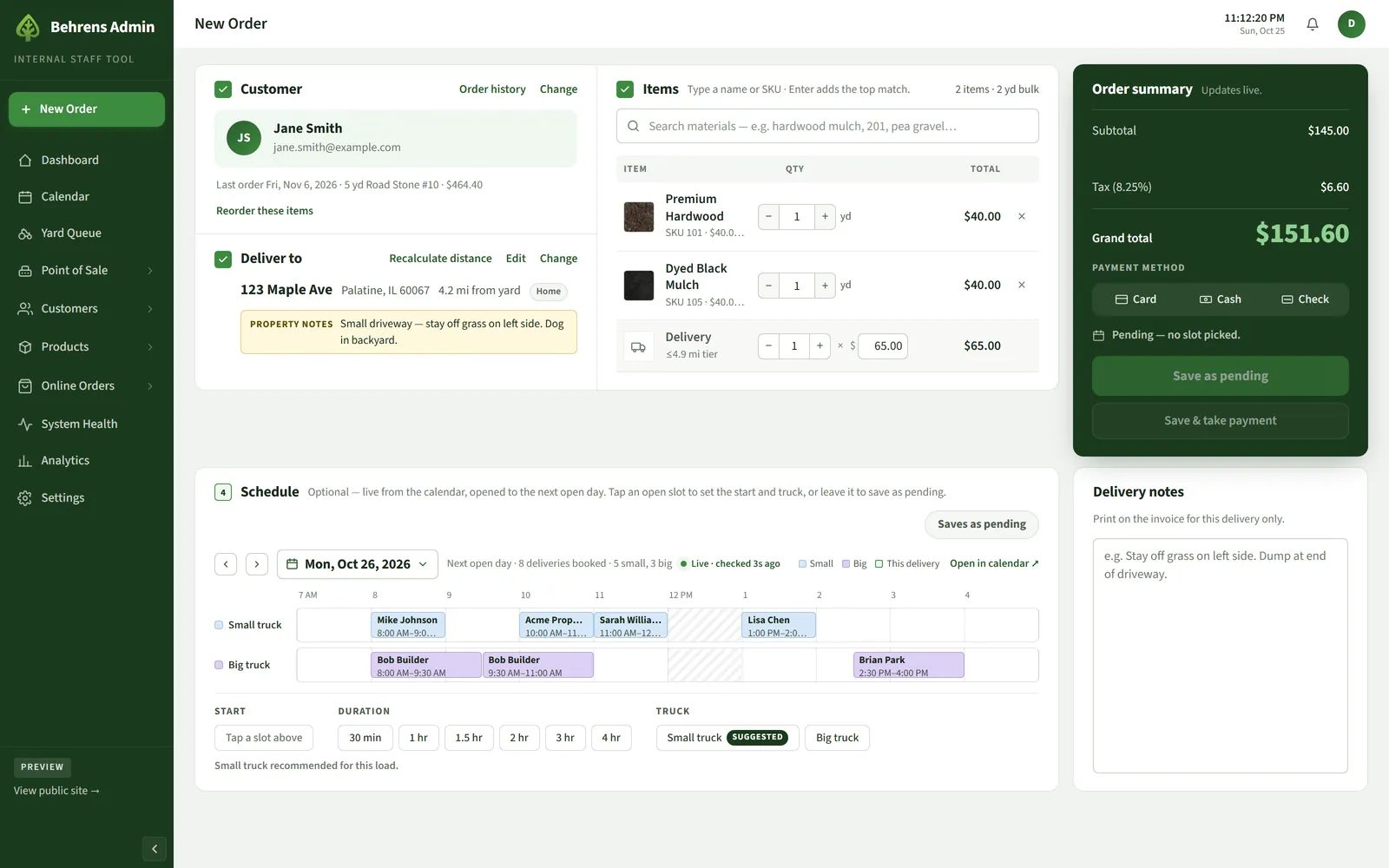
What you’re looking at 5 notes
- Last order and reorder. Choosing a customer shows their last order, ready to repeat in one click.
- Property notes. Notes about the site follow the address onto the delivery ticket.
- Delivery fee. Priced automatically from the driving distance to the yard.
- Live totals. Subtotal, sales tax, and grand total update as items change.
- Open truck slots. The next open day’s schedule, live from the calendar, with the right truck suggested for the load.
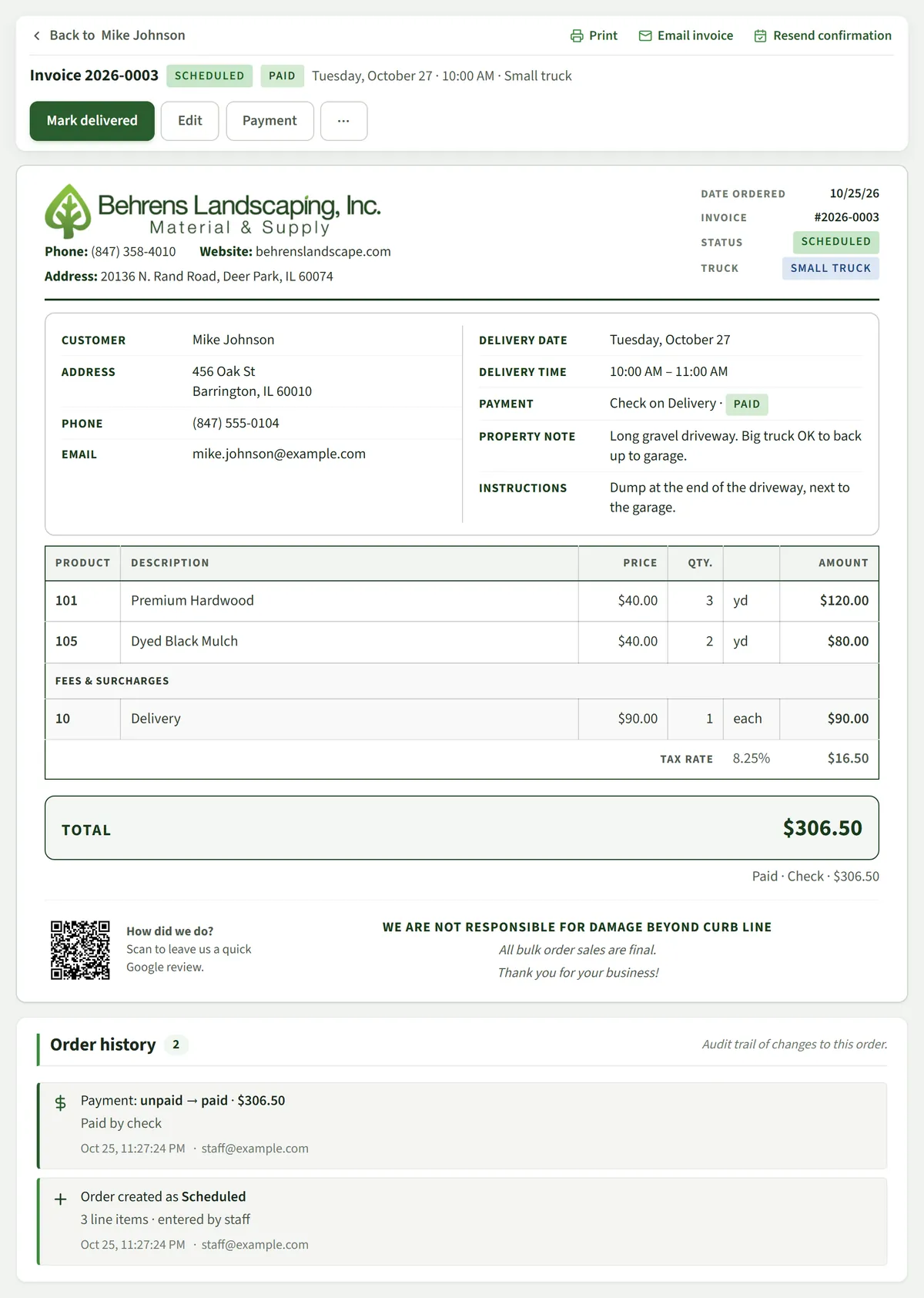
What you’re looking at 6 notes
- Invoice built from the order. Nobody types an invoice. When staff save a new order, the invoice is generated from what they entered: customer, delivery address and property notes, items and quantities, the delivery fee, tax, payment, and the delivery date and truck. It gets the next invoice number and is ready to print or email.
- Next steps in one place. Mark it delivered, edit it, or record a payment without leaving the order.
- Print or email. The emailed PDF uses this same invoice layout.
- On the calendar. A delivery booked with a time slot shows on the calendar for that day and truck as soon as the order is saved.
- Fees listed separately. Delivery and other fees sit apart from materials, with sales tax on the total.
- Order history. Every change is logged with who made it and when.
From order to invoice to calendar
An order comes in
Staff enter it at the counter or over the phone, or a customer places it through online checkout.
The invoice is created automatically
Every order gets the next invoice number, ready to print or email. Paid online orders email the customer the invoice as a PDF with their receipt.
The delivery goes on the calendar
Orders booked with a time slot appear on the delivery calendar right away. Online orders hold the customer’s chosen day and window until staff confirm the exact time.
05Operations
Taking payments with Clover
Behrens Landscaping already used Clover to take payments, so the project connects Clover to every way the business gets paid, online, at the register, in the yard and over the phone, instead of replacing it.
- Online checkout
- Customers type their card into Clover’s secure fields inside the order page. The site never sees the card number; it charges a one-time token from Clover.
- The register
- Walk-in sales are rung up on a touch-friendly register in the staff tools: tap the products, then take cash, a check, or a card on the Clover Mini at the counter. The server re-prices every sale before it’s recorded, the Mini prints the receipt, and customers can get the same receipt by email. A Today view totals the day for closeout.
- In the yard
- A Clover Flex takes card payments out in the yard, run from the same staff tools, and the result is recorded on the order.
- By phone or on account
- Staff key a card into the same secure Clover fields. With the customer’s permission, Clover keeps the card on file; the business stores only the last four digits and the card brand.
- Refunds
- Refunds go back to the original card and are recorded only after Clover confirms them.
Every payment attempt carries a one-time key, so a dropped connection or a second click can’t charge a customer twice. When a charge succeeds, the order, its invoice and the customer’s receipt are created automatically, and a nightly check compares Clover’s records with the business’s books and flags anything that doesn’t match.
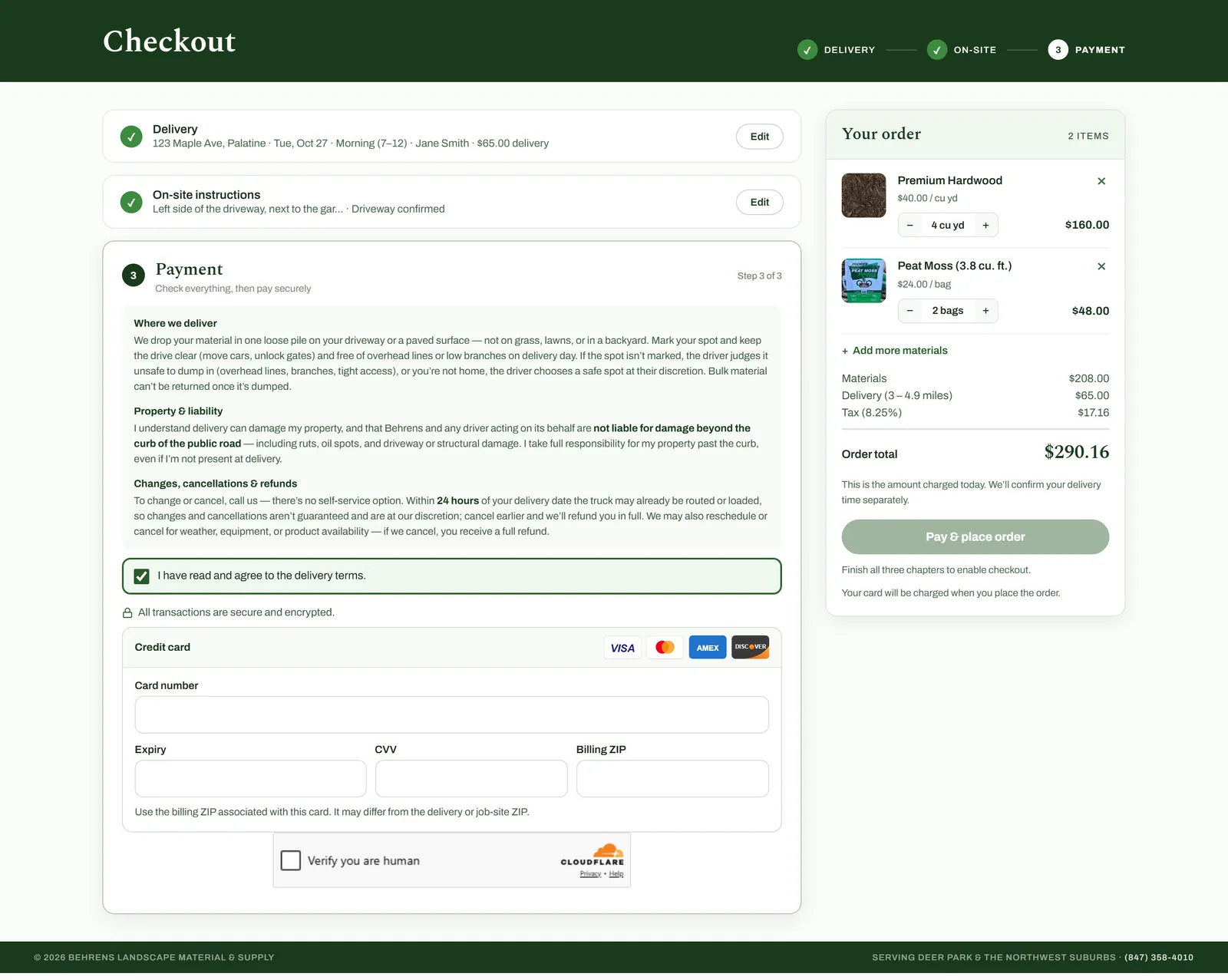
What you’re looking at 5 notes
- Review before paying. Each finished step is summarized with an Edit button.
- Terms agreed up front. Customers accept the delivery terms before they can pay.
- Clover’s secure card fields. These boxes are hosted by Clover. The card number goes straight to Clover; the site only receives a one-time token to charge.
- Cloudflare Turnstile. Confirms a real person is checking out before any card is charged. Most customers never see a challenge.
- One click, one charge. Every payment attempt carries a one-time key, so a retry after a dropped connection can’t charge twice.
06Foundations
Security built in
The website and staff tools run on Cloudflare, which serves every page over HTTPS from its global network and filters attack traffic before it reaches the site.
- Staff tools behind a sign-in
- The admin sits behind Cloudflare Access. Staff sign in before it loads, and the server checks that sign-in on every request.
- Checkout guards
- A Cloudflare Turnstile check confirms a real person before any card is charged, requests are rate-limited, and repeated declines lock out card-testing attempts.
- No card numbers stored
- Card details are handled by Clover’s secure fields and devices, never by the business’s servers or database.
- Strict browser rules
- HTTPS-only, protection against being framed by other sites, and a content security policy that limits which scripts can run. The checkout’s allowed scripts are locked down and checked by automated tests.
- Private by default
- Details customers type into forms are masked in the session recordings used to improve the site.
- Backups
- A 30-day point-in-time restore, nightly backups kept for 90 days, and copies staff can download.
07Foundations
Learning from real visitors
Microsoft Clarity shows anonymized recordings and heatmaps of how people actually use the site. It went in early in the redesign and is still how the next fix gets chosen: watch where real visitors get stuck, then change the page.
- Category cards that go somewhere
- Recordings showed visitors tapping a category on the homepage, then scrolling past every other category to find it. The cards now jump straight to that section of the products page.
- The whole product card opens
- Visitors tapped prices and descriptions expecting something to happen. Now the entire card opens the product details, not just the photo.
- Smoother pages on phones
- Cut-off recordings exposed pages doing needless work on every scroll, which also made the order page jitter on phones. Those updates now run only when something actually changes.
- Less bot noise
- Short sessions from overseas turned out to be crawlers and scanners. Cloudflare firewall rules now challenge or block them, so the numbers reflect real customers.
Customer details stay private: names, phone numbers, addresses and notes are masked in every recording, and automated tests make sure the masks stay in place. Key moments such as reaching the payment step are tagged, so it’s easy to find sessions where someone got stuck, and a daily snapshot of friction signals (rage clicks, dead clicks, quick backs) feeds the staff analytics page.
08Foundations
Getting found in search
A new website only helps if people can find it. The redesign rebuilt the site’s search foundations, and the work continued as the site grew.
- A page for every town served
- Fifteen delivery pages, one per nearby town, built from a single template, linked to neighboring towns, and showing delivery prices pulled from the live rates.
- A page for every product
- Each product has its own page with details search engines can read, and the sitemap picks up new products automatically.
- Helpful guides
- Pages such as mulch versus stone, topsoil for a new lawn, and preparing for a bulk delivery answer real customer questions, with prices kept current from the catalog.
- Speaking search engines’ language
- Structured data describes the business, its services, and common questions, and the site is connected to Google Search Console and Bing Webmaster Tools.
- Nothing lost in the move
- Links from the old Squarespace site redirect to the matching new pages.
- Ready for AI assistants
- Key pages read correctly without JavaScript, AI crawlers are welcome, and a plain-text summary of the business is generated from live data.
- Fast pages
- Images are sized, compressed, and loaded only when needed, so pages appear quickly on phones.
09Foundations
Making the ad budget count
Behrens Landscaping runs Google Ads. A review of the account in September found the campaign was optimizing for taps on “Get directions” while the actions that matter, online orders and delivery-quote requests, were never reported back to Google.
- Real results reported
- Paid online orders, with their value, and delivery-quote requests are now sent to Google Ads as conversions, alongside phone taps, so the campaign can optimize for customers instead of map taps.
- Better matching, privately
- Enhanced conversions use the customer’s email or phone, hashed by Google’s tag before it leaves the page, and the privacy page explains it.
- Where each order came from
- Every order records its first source, such as an ad campaign, search, an AI assistant, email, or another site, and the staff analytics tab shows orders by campaign.
- Account recommendations
- The same review laid out account changes such as bidding goals, ad schedule, service radius, negative keywords, and new ad copy.
10Growth
Built in response to the next need
The complete system was not the original redesign scope. It grew as the business needed or wanted more. Each addition became another opportunity to understand the workflow, agree on a useful change, and build around how people would use it.
- Website redesignWhere it startedFoundation
- Customer toolsCalculator, delivery, orderingFor customers
- Staff toolsRecords, orders, schedulingFor the team
11Growth
Six months, month by month
The project ran from mid-April to late October 2026 in small, frequent releases: more than 2,600 changes shipped as over 1,100 versions, with more than 2,000 automated tests checking each one. Small releases meant each improvement could be put to work as soon as it was ready, and a failing check stopped a release before customers saw it.
April 2026
Redesigned the public website, rebuilt its search setup, and connected Google Search Console and Bing. Started the staff tools with a product catalog, a delivery calendar, and nightly backups.
May 2026
Brought in existing contacts, built the delivery-quote request flow, and rebuilt product management.
June 2026
Redesigned the staff dashboard, added saved cards and phone payments through Clover, and gave every product its own search-friendly page.
July 2026
Online ordering went live on July 8 with receipts and invoice PDFs. Added the in-store register and Clover Mini, imported 19 years of QuickBooks history, built more town pages, and put a bot check on checkout.
August 2026
Added end-of-day closeout and reconciliation, phone sales, and yard counts, then ran an SEO audit and a round of fixes.
September 2026
Added house accounts, made the register and staff tools work on phones, tightened money safeguards, and ran a Google Ads audit that led to new conversion tracking.
October 2026
Rebuilt the new-order screen, enforced a stricter browser security policy, added an analytics tab showing where orders come from, set up a customer-facing screen at the counter, and made the site readable for AI assistants.
12Reflection
Lessons learned
What this project taught me about building for a working business.
Start useful, then listen.
Online ordering and the staff tools weren’t on the original list. They came from conversations after the redesign was already working, which kept every addition tied to a real need.
Let tests guard each release.
An automated test suite runs before every release, and a failing test stops the deploy. When a site takes real orders, problems need to be caught before customers find them.
Handle orders and payments with extra care.
Money is tracked precisely, payment changes are tested carefully, and backups have documented restore steps, because mistakes there affect real customers.
Design for where the work happens.
Staff use these tools at the counter, in the yard and in the office, so each screen is built around the moment it’s used: taking an order, loading a truck, or checking the schedule.
The same approach can start smaller
Your business may only need a clear, dependable website today. That is a worthwhile project on its own. If new needs emerge later, we can plan the next feature together.